
Deal Stage Probability Forecast
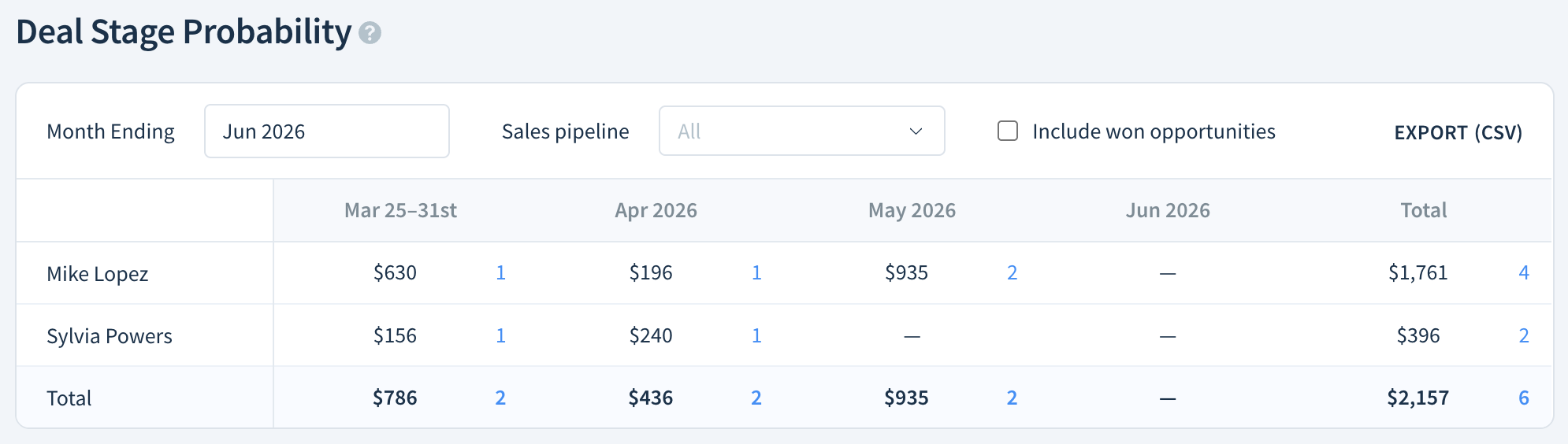
The Deal Stage Probability forecast shows you how much new MRR your sales team is likely to close each month. It multiplies each deal's value by its win likelihood percentage to give you a probability-weighted revenue estimate.
Use it to align pipeline activity with revenue planning — without relying on hard totals alone.
Use the forecast to:
- Estimate future revenue by predicting the MRR your sales team will close in a defined time period.
- Share a new MRR estimate with internal and external stakeholders.
- Understand and plan to solve for any gaps between current growth and estimated targets.
Before you begin
Before viewing this forecast, you’ll need to set up your sales pipelines and create an opportunity.
How to Read the Deal Stage Probability Forecast
Access the Deal Stage Probability Forecast by navigating to Opportunities > Saved Views > Sales Forecasts > Deal Stage Probability.
This forecast shows your estimated new MRR — Monthly Recurring Revenue — for each upcoming month. As you mark opportunities as won, their win likelihood reaches 100%, which raises the total MRR value shown in that month's column.
Each column is a month. The first month shows the remainder of the current month.
ChartMogul breaks the forecast down by opportunity owner — the team member assigned to a deal. Each owner's MRR value is the sum of their open deals, each multiplied by its win likelihood percentage.
Report Notes
- Only opportunities with the Value type MRR contribute to this report. One-time opportunities are excluded.
How to Configure Your Forecast
Use the Month Ending date picker to choose how far into the future you’d like to see.
The month of an opportunity’s Estimated Close is the month it contributes to in the report.
Use the Sales pipeline drop-down to display All pipelines or a select pipeline.
To see MRR gained from won opportunities in the month, select Include won opportunities.
Select a cell to view open Opportunities.
Click EXPORT (CSV) to download the forecast as a CSV file.
Next Steps
- Track forecasted MRR for each forecast category with the Forecast Category Report.
- See the total amount of MRR from subscribers with Monthly Recurring Revenue (MRR).