
Committed MRR Forecast
The Committed MRR Forecast is a report that projects your Monthly Recurring Revenue (MRR) based on scheduled subscription changes — such as planned upgrades, downgrades, and cancellations — so you can see future revenue before it's recognized.
Use it to forecast MRR and ARR, analyze upcoming movement types, and reach out to customers scheduled to churn.
CMRR is available for use with Recurly, Stripe, the latest version of our Chargebee integration and custom sources.
Resources and further reading:
Before you begin
- Committed rows use scheduled subscription events to calculate MRR. Subscription events are currently supported for Recurly, Stripe, Chargebee (latest version) and custom sources.
- For Recurly, New Business and Reactivation are not reported in the forecast as Recurly does not support the Start (Scheduled) subscription event type.
How to Read the Committed MRR Forecast
Access the Committed MRR Forecast by navigating to Reports > Recurring Revenue > Committed MRR Forecast.
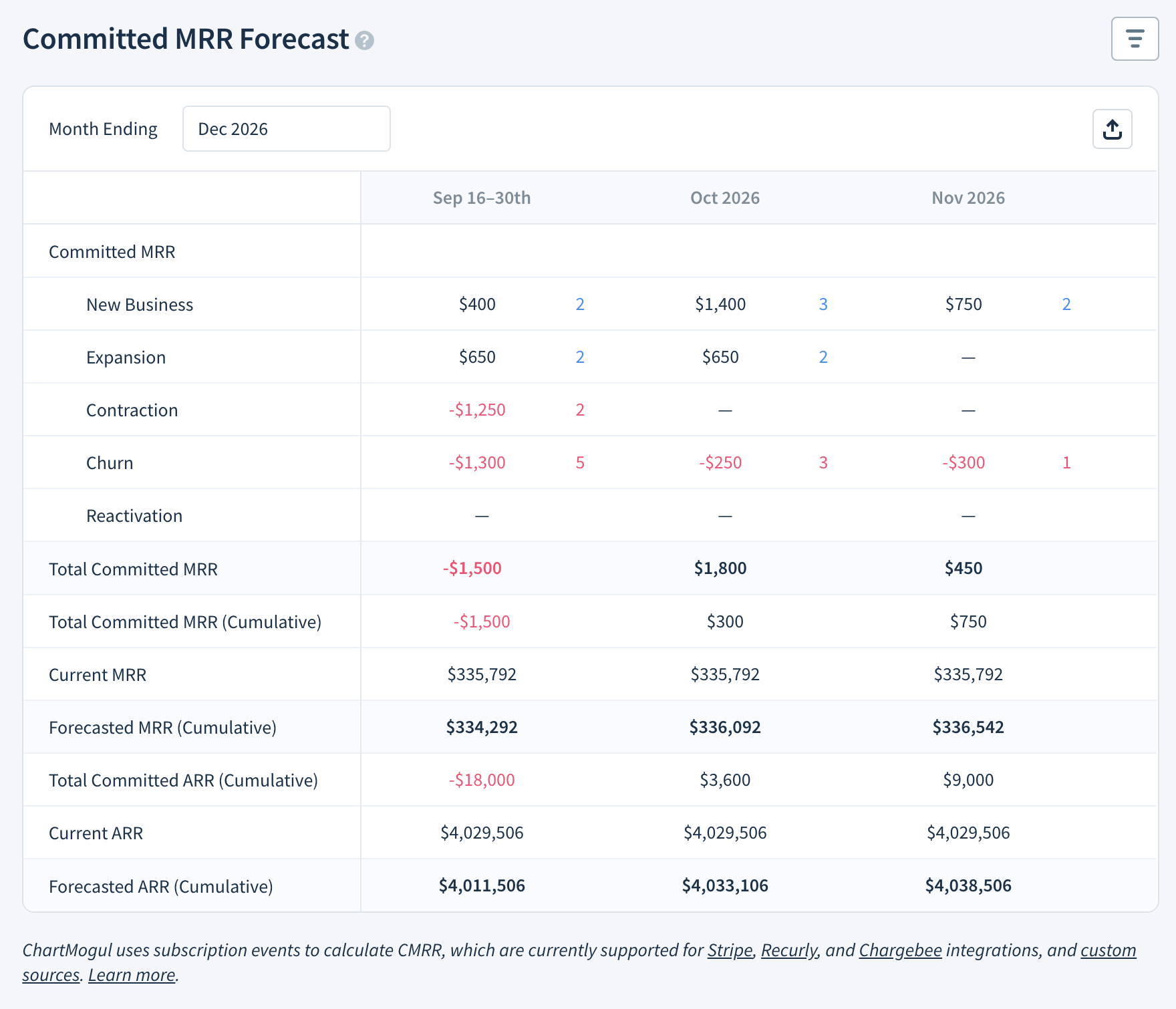
This forecast shows a snapshot of your current MRR alongside future committed MRR. When a scheduled subscription event occurs, it moves from committed to Current MRR. Each column represents one month. The first column shows only the remainder of the current month.
ChartMogul breaks down Committed MRR into five standard MRR movement types:
The forecast table also includes these summary rows:
- Total Committed MRR — the net new revenue from scheduled subscription events in that month.
- Total Committed MRR (Cumulative) — a running total of Total Committed MRR across months.
- Current MRR — your current monthly recurring revenue, calculated from invoice data. Same as MRR.
- Forecasted MRR (Cumulative) — your projected MRR for a given month: the sum of Total Committed MRR (Cumulative) and Current MRR.
- Total Committed ARR (Cumulative) — Total Committed MRR (Cumulative) × 12.
- Current ARR — your current annual run rate, calculated from invoice data. Same as ARR.
- Forecasted ARR (Cumulative) — your projected annual run rate for a given month: the sum of Total Committed ARR (Cumulative) and Current ARR.
How to Configure Your Forecast
Use the Month Ending date picker to choose how far into the future you’d like to see.
Use segmentation as part of your forecast for further analysis.
Export the forecast as CSV by clicking Export (CSV).
Select the month of the following cells to see the Activity table. This table lists the customers associated with the movement type and can be exported as a CSV:
- New Business
- Expansion
- Contraction
- Churn
- Reactivation
- Total Committed MRR