
Report: Average Sale Price
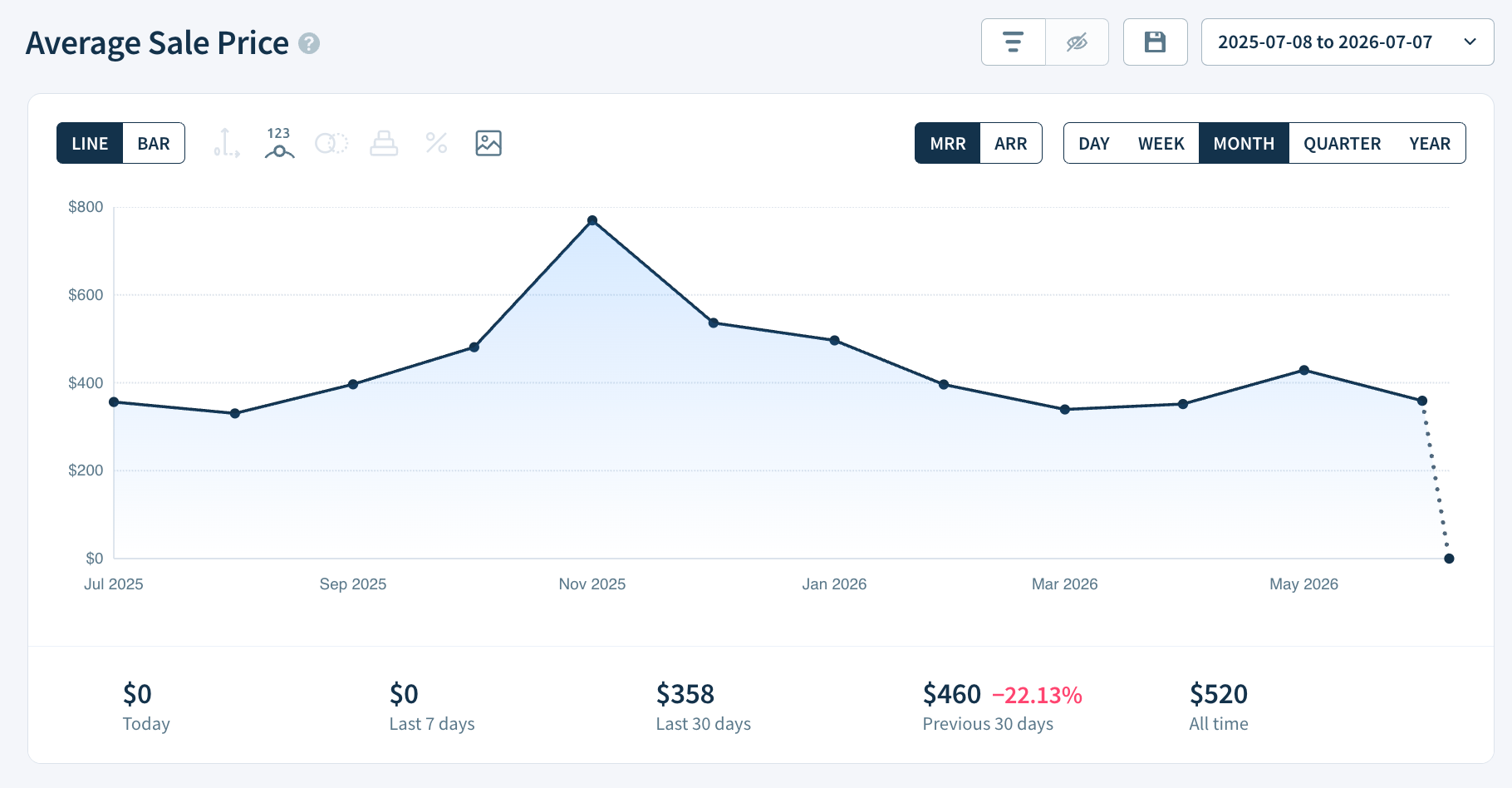
The Average Sale Price (ASP) report shows the average initial MRR of new subscriptions over time.
ChartMogul calculates this metric using first-time paid subscriptions only — upgrades and changes to existing subscriptions aren't included. For SaaS businesses, ASP is an early signal for whether customer lifetime value (LTV) is trending up or down, and a useful lens for evaluating sales performance, pricing strategy, and where to focus acquisition spend. Unlike ARPA (average revenue per account, which covers all active subscribers), ASP focuses only on the entry-point value of new customers.
If you're new to ChartMogul, get to know how reports work.
If you’re interested in analyzing the average MRR for current subscribers, see Average Revenue Per Account.
What You Can Learn from Average Sale Price
Average Sale Price is useful for measuring efforts to increase the average deal size of new subscribers and provides an early indication of whether customer lifetime value (LTV) is likely to increase or decrease in the future.
ASP is also a useful financial metric for assessing sales team performance, identifying which regions to spend advertising budget and defining pricing strategy.
What to Know About This Report
- ChartMogul classifies the MRR from a customer’s first subscription as New Business. Subsequent changes to that subscription’s MRR — for example, an upgrade or downgrade — don’t count toward this metric. Learn more about MRR movements.
- Only recurring invoice line items (subscriptions and trials) and manual subscriptions contribute to this report. Non-recurring items such as setup fees don’t contribute to this report.
- Toggle between the default (MRR) and annualized (ARR) view. All Report Data values update to match. Learn how to switch between MRR and ARR.
How ChartMogul Calculates Average Sale Price
ChartMogul calculates Average Sale Price as total New Business MRR — revenue from customers subscribing for the first time — in a given period, divided by the number of those new customers.
For example, you acquire ten new subscribers in May:
- Three purchase a Gold Plan at $100/month
- Seven purchase a Silver Plan at $50/month
Your Average Sale Price is $65 — calculated as ((3 × $100) + (7 × $50)) ÷ 10.
How to Read the Report Data Table
See Report Data.
Next Steps
- See which region or industry has the highest value deals with segmentation.
- See total expected revenue per subscriber with the Customer Lifetime Value report.
- Learn more about ASP in our SaaS metrics library.