
Analyzing discount ratio to optimize pricing
Pricing optimization is key to reducing friction for potential customers and ensuring your product is perceived as valuable. One indicator of pricing efficiency is the ratio of discounted to non-discounted subscriptions. A lower discount ratio suggests that your pricing is aligned with perceived value and minimizes the need for discounts.
In this article, we’ll demonstrate how to use segmentation in ChartMogul to analyze the discount ratio and its impact on pricing strategy.
How to set up discount and location attributes
If you import data from a billing system integration (a direct connection between ChartMogul and your billing tool, such as Stripe or Recurly), ChartMogul automatically detects discounts and customer location. It exposes these as standard attributes — built-in fields you can filter on without any extra setup.
If you import data using a custom source (a manually configured data import, rather than a native billing integration), you'll need to add discount amount and location data yourself before you can use the filters in this article.
Comparing discounted and non-discounted segments
To compare your discounted and non-discounted subscribers in ChartMogul, follow these steps. You'll create two segments — one filtered by Has discount — is true and one by Has discount — is false — then view them side by side on the same chart.
- Navigate to the Subscribers report.
- Click the Apply a filter or saved segment button.
- Select a Plan — is one of — the plan or plan group you want to filter, and click Add.
- Click +, select Has discount — is true, and click Add.
- Click the Apply a filter or saved segment button again.
- Select the same plan or plan group you selected earlier, and click Add.
- Click +, select Has discount — is false, and click Add.
How to Interpret Your Discount Ratio
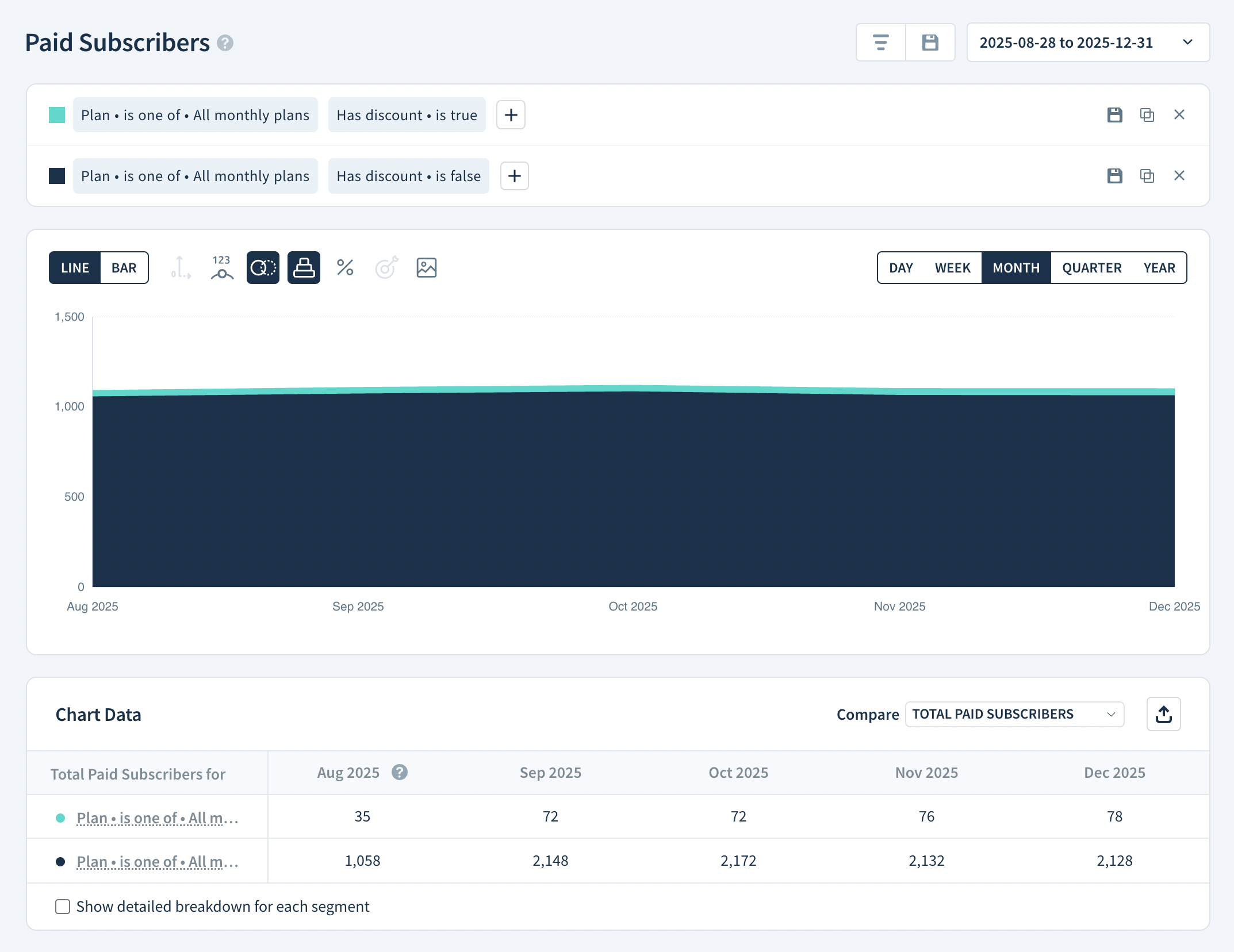
In this example, most customers on monthly plans don't have a discount. That means the perceived product value meets or exceeds the price — a sign your pricing is well optimized.
Next steps
- Apply additional segmentation to break down discount usage by plan or plan group.
- Compare discount trends over time to see how pricing changes affect how often customers need a discount.
- Test price adjustments and track whether fewer customers require a discount after each change.
Share Your Analysis With Us
Found an analysis that's given you useful insights? If you think it could help others, reach out to support and share it with us.