
Getting started with destinations
Destinations is a ChartMogul feature that lets you export your subscription data — MRR movements, customer records, and calculated metrics — to external tools on a scheduled or real-time basis.
Use it to send MRR movements and customer data to HubSpot or Intercom; export calculated metrics and source data to data warehouses such as Amazon Redshift, Google BigQuery, or Snowflake; store data in object storage services like Amazon S3, Azure Blob Storage, or Google Cloud Storage; receive MRR updates in Slack, trigger webhooks on MRR movements, or deliver scheduled exports via email.
Standard destinations (HubSpot, Intercom, Slack, Webhooks) are available on all plans with MRR under $10k; advanced destinations require the Pro, Enterprise, or Legacy Scale plan
Here’s what we cover in this article:
- Available destinations
- Available datasets
- Update frequency
- Adding a destination
- Deleting a destination
Before You Begin
- Learn about MRR movements.
- Familiarize yourself with customer and subscription statuses in ChartMogul.
- Learn how to use tags and custom attributes.
Available Destinations
ChartMogul offers standard destinations and advanced destinations. The number of destinations you can use depends on your plan.
Standard destinations
Standard destinations let you push MRR updates and customer data from ChartMogul. They're available on all plans.
Advanced destinations
Advanced destinations allow you to export normalized data and computed metrics from ChartMogul to your data warehouse, cloud storage service or via email. Advanced destinations are available on select plans.
- Data warehousing solutions:
- Object storage services:
Learn more about the available destinations on our Developer Hub.
Available Datasets
For most destinations, you can send two types of data: source data (imported from your billing system and mapped to ChartMogul's data model) and calculated data (metrics and calculations from your ChartMogul account). Each type includes:
Source Data
- Currency rates — exchange rates used to convert amounts in foreign currencies
- Custom attributes — additional data points you add to customers, contacts or opportunities that help you with search, filtering and segmentation, such as the marketing campaign used to acquire a customer or a contact’s preferred communication method
- Tags — keywords that help you classify and group customers in ChartMogul, for instance,
managed-accountorfree-plan
Calculated Data
- MRR activities, including MRR movement types (New Business, Expansion, Contraction, Churn or Reactivation), amounts and descriptions
Read a detailed reference of the available datasets on our Developer Hub.
Customers can be sent as source data or calculated data.
Customers sent as source data includes information from the customer record that is created when ChartMogul imports the customer from your integration, such as name, email, country and ChartMogul ID (UUID). Each customer in source data is associated with one customer in calculated data.
Customers sent as calculated data includes basic customer details as well as data from your ChartMogul account such as customer names, monthly recurring revenue (MRR), annual run rate (ARR), net payments or customer statuses. These are the customers you see on customer lists. Each customer in calculated data is associated with one or more customers in source data. When customers are merged, multiple customers in source data become tied to the same customer in calculated data.
Here’s a breakdown of available datasets by destination:
| Destination type | Available datasets |
|---|---|
| Amazon Redshift, Amazon S3, Azure Blob Storage, Google BigQuery, Google Cloud Storage, Snowflake | |
|
Source Data
Calculated Data
|
|
| Intercom |
Customer data:
|
| Slack | MRR updates |
| Webhook | MRR movements |
Update frequency
How often ChartMogul sends data depends on the destination type — standard destinations like Slack support real-time updates, while advanced destinations (data warehouses, object storage, email) use a scheduled interval you configure.
Data warehousing, object storage and email
For data warehousing (Amazon Redshift, Google BigQuery, Snowflake), object storage (Amazon S3, Azure Blob Storage, Google Cloud Storage) and email destinations, configure the Update Frequency setting to send data at the following intervals:
- Daily
- Weekly
- Monthly
Select SEND DATA NOW in the configuration modal to trigger a manual export outside of your scheduled intervals.
Manual exports must be at least three hours apart. There’s a limit of five manual exports per day and fifteen manual exports per month.
HubSpot and Intercom
For HubSpot and Intercom destinations, ChartMogul sends data once per day starting at 9:00 UTC. You can’t customize the update frequency for these destinations.
Slack
For Slack destinations, choose one of the following Update Frequency options:
- Real-time
- Daily
- Weekly
- Monthly
Webhooks
Webhooks are triggered whenever an MRR movement occurs. Learn more.
How to Add a Destination
To add a destination, follow the instructions for your destination type:
- Amazon Redshift
- Amazon S3
- Azure Blob Storage
- Google BigQuery
- Google Cloud Storage
- HubSpot
- Intercom
- Slack
- Snowflake
- Webhook
Add and manage destinations by navigating to Settings > Data & Integrations > Destinations.

How to Delete a Destination
Deleting a destination is permanent and cannot be undone.
To delete a destination:
- Navigate to Settings > Data & Integrations > Destinations.
- Find your destination in the list and click the Settings icon.
-
Click DELETE.
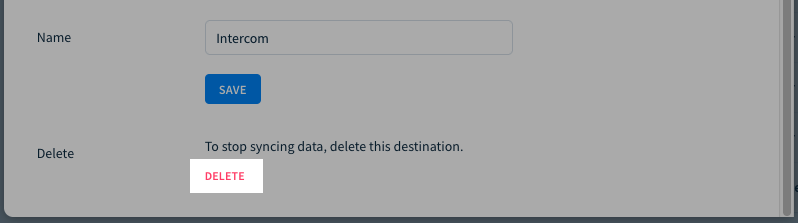
ChartMogul will stop sending updates configured as part of this destination.
Next steps
- Learn more about destinations on our Developer Hub.