
Report: Subscription Movements
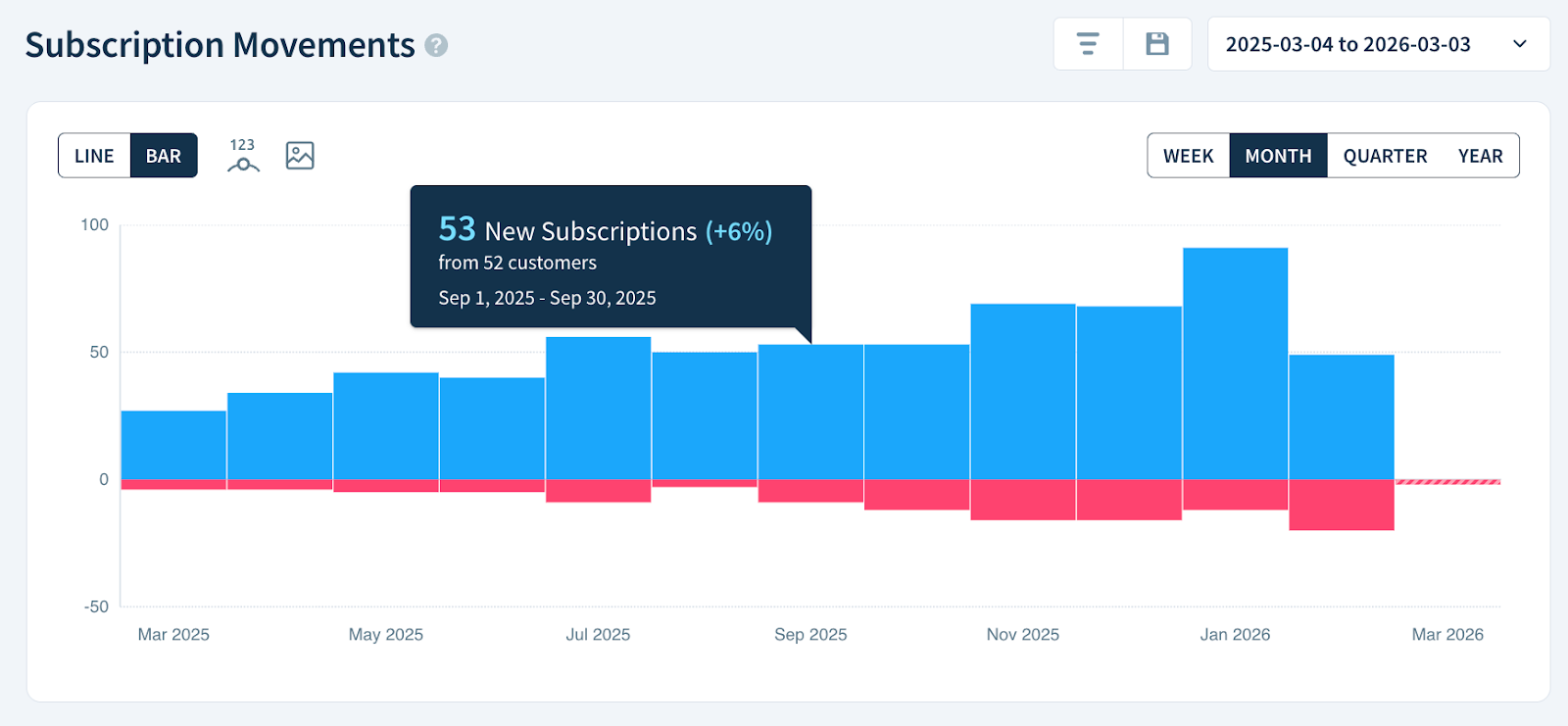
The Subscription Movements report tracks how your paid and free subscriptions grow or shrink over time. Each period appears as a vertically stacked bar with color-coded bands representing new and canceled subscriptions, so you can spot trends, seasonal patterns, and the impact of pricing changes at a glance.
If you're new to ChartMogul, get to know how reports work.
What to Know About This Report
- Each vertically stacked band represents a specific subscription movement type: New Subscriptions are blue, while Cancelled Subscriptions are pink.
- Multi-component subscription sets are counted as a single subscription, regardless of the number of individual components within the set.
Free subscriptions
This report is only available for accounts with free subscription and trial line item support. We introduced this functionality on October 2, 2025 and are gradually making it available to all accounts.
How ChartMogul Calculates Subscription Movements
ChartMogul counts the number of new and canceled subscriptions in each period. Multi-component subscription sets are counted as a single subscription.
How to Isolate Individual Movements
- Scroll to the Report Data table below the report.
- Click the :font-invisible~gray: eye icon next to any movement type to show or hide it.
How to Read the Report Data Table
The Report Data table — the detailed data grid below the report — works differently for Subscription Movements than for other reports. It provides the following breakdown:
- New Subscriptions — The number of paid and free subscriptions started in the period.
- Cancelled Subscriptions — The number of paid and free subscriptions canceled in the period.
- Net Subscription Movement — The net gain or loss of paid and free subscriptions in the period.
- Change — The percentage change in paid and free subscriptions compared to the previous period.
- Total Subscriptions — The total number of paid and free subscriptions in the period.
Next Steps
- Use segmentation to break down subscription movements by region, plan, or custom attribute (such as industry or marketing channel).
- Use Subscriber Movements to visualize fluctuations in paying subscribers over time.